
Is there a simple way to capture a screenshot of an entire web page?
I always wondered this, and just now found the answer.
Gone are the days of cobbling together multiple screenshots that fit like a four-year-old cut them out with rusty scissors too big for their little mitts.
Here is the brave new world of one single seamless PNG that captures an entire webpage.
Thank you, Parabellum1975!
Here’s what to do:
1. Open Chrome.
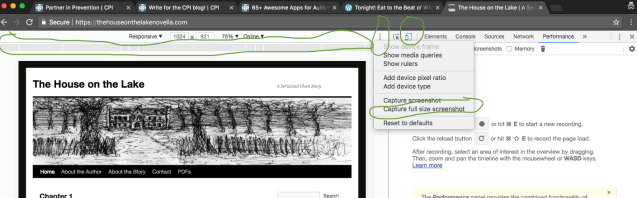
2. Press Option/Alt + Command + I. (I think Command is the Windows key on a PC, but I don’t remember for sure.) This will give you a developer’s view.
3. Click the device icon.
4. Click the grey bars to select the view you want: Tablet, Laptop, Mobile, etc.
5. Click the three dots.
6. Choose “Capture full-size screenshot.”
7. Locate the file wherever you have Chrome set to store downloads.
Please let me know if this changes your life as much as it’s evolved mine.
Update two days later: Interesting! Firefox has within the last couple of days automatically installed a beta version of a new-to-me function called Firefox Screenshots. Now, if I surf the Internet for “find a million dollars” and then write a post about finding a million dollars, will a million dollars automatically install itself in my bank account?